
Mission Preparation Shouldn’t Require Guesswork
For integrators, setting up an inertial navigation system has historically been a frustrating, time-consuming process.
You’re often relying on bespoke software, using outdated tools, or poring over manuals that lack step-by-step guidance for your specific mission setups. Poor user-interfaces often lead to ambiguity and cause frustration and costly support calls.
The result is your highly skilled engineering team wasting time on troubleshooting instead of deploying their platform in the field.
Studio Features

Skip the manual configuration
Automatic network device discovery instantly finds your hardware, overcoming the tedious comms configuration required by legacy tools.
Configure with confidence
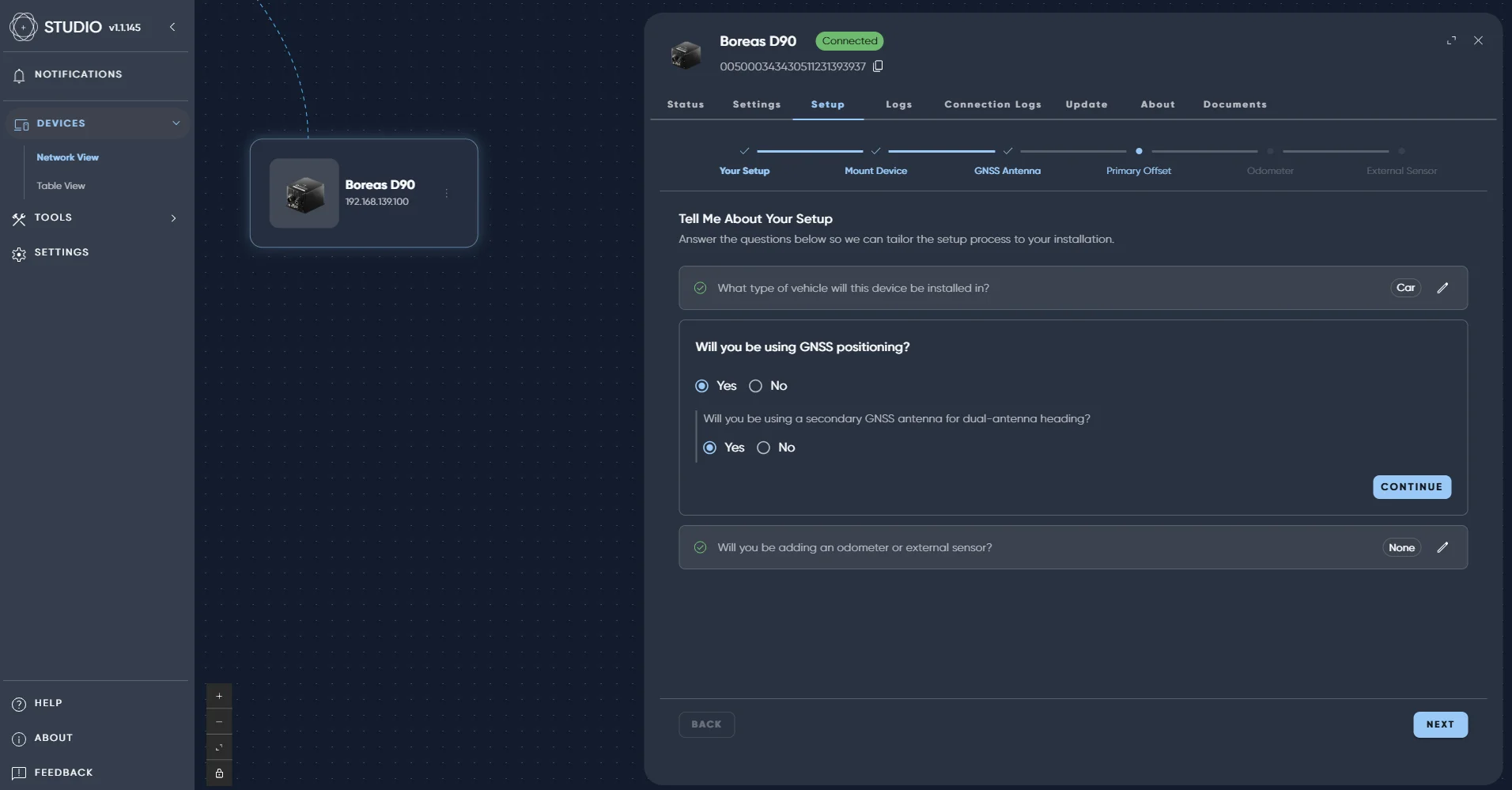
Dynamic setup wizards guide you step-by-step, replacing the trial-and-error of legacy applications with a clear setup path.
Streamline your support workflow
Download and convert log files in one quick step. Be ready with the information needed so our team can analyse and solve in a single interaction.
Scale your deployments instantly
Import/export functionality empowers operators to quickly replicate configurations across multiple devices, meaning you never have to start the next setup from scratch.
Never get stuck offline
Download local copies of up-to-date manuals so your team has continuous access to step-by-step support in the field, even without an active internet connection.
Never Go Into the Field With a False Sense of Security
STUDIO transforms the complex process of navigation setup into a streamlined, guided experience.
STUDIO allows you to manage, configure and support our INS range in a central, visualized location. A built-in connection wizard automatically discovers your devices and guides first-time users through the connection process, designed to overcome early integration hurdles.
With STUDIO, you can free up your team for more high value tasks, catch configuration issues early, and reduce the risk of operational delays through immediate validation.

“As a Validation Engineer, I continuously search for better tools to manage my INS products. Mapping my network, visualizing physical configurations, and with guided installation; STUDIO is the perfect solution – it’s getting my navigation solutions off the ground as fast as possible.”
Christie Kearney, Product Validation Engineer, Advanced Navigation
FAQs
What is STUDIO?
STUDIO is a unified Windows and Linux application designed to configure, manage and validate our INS range from a single application. STUDIO delivers a modern, streamlined user experience that demystifies complex technical environments. By eliminating legacy dependencies, guiding configuration, and accelerating support workflows, we drastically reduce time-to-value and empower users of all technical skill levels to operate autonomously.
How does STUDIO save time during integration?
STUDIO replaces manual configuration and trial-and-error with guided setup wizards and validation tools. Compared to legacy INS managers that often take significant time to debug and configure device setups, STUDIO has been designed to take the guesswork out of configuring your INS.
Which devices are compatible with STUDIO?
STUDIO allows for streamlined INS management, seamlessly working with Boreas and Certus products, replacing bespoke, product-specific software that you would find with other navigation suppliers.
How do I download Advanced Navigation’s STUDIO?
- Download STUDIO and select the latest version for your browser.
- Locate the download file and run it.
- STUDIO will then initialize as a normal application on your computer.
How many devices can I see at once?
STUDIO is designed to allow you to see and manage multiple devices (up to 20) simultaneously.
How can I provide feedback during the STUDIO Beta release?
We highly value your input as we continue to refine the software. To share your feedback or report any issues, please raise a support ticket directly through the “Help” tab within the STUDIO application. We may also hold a dedicated feedback event in the future to hear more about your experience with STUDIO and how we can continuously improve.
Be The First To Access

Get exclusive updates, launch details, and early access information for AdNav Intelligence.